
For most of the last decade, choosing a cloud data platform meant more than choosing an engine. It also decided where the data lived, which format it was stored in, and which tools could read it. Every additional platform meant another copy, another pipeline, and another version of the truth.
Open table formats such as Apache Iceberg separate the data from the engine that writes it. Snowflake can write a table into storage the organization owns, and Microsoft Fabric can read that same table in place, with no copy and no ETL between them.
In practice, that means one copy of each table, stored in the organization's own Azure storage account.
This guide explains why lock-in happened, how Apache Iceberg works, and what a Snowflake-to-Fabric open lakehouse looks like end to end. It also covers the limits that still apply and the configuration mistakes that most often get in the way.
Why Lock-In Happened
Few organizations chose lock-in on purpose. It built up from three practical constraints.
Proprietary storage formats. Each warehouse stored tables in its own internal format. Only that vendor's engine could read them directly, so the data and the engine were effectively one product.
Copies to collaborate. When another team needed the same data in a different tool, the answer was a pipeline. Extract, transform and load (ETL) jobs copied data out on a schedule, which created a second copy to store, secure and reconcile, and data that was always hours behind.
Expensive exits. Moving away meant paying egress fees to move data out of a cloud, re-platforming every table, and rewriting every pipeline that touched it. The longer a platform was in use, the more it cost to leave.
All three have the same root cause: the table format belonged to the engine. An open table format removes that dependency.
|
Lock-in driver |
What it costs |
What changes with an open format |
|
Proprietary storage |
Data readable by one engine only |
Any compatible engine reads the same files |
|
Copy pipelines |
Duplicate storage, stale data, maintenance |
Engines read in place; no copy to manage |
|
Exit costs |
Egress fees and re-platforming |
Data already sits in storage you own |
Copies vs. One Open Copy
In a copy-based estate, every engine keeps its own version of the data. Each hop adds storage, a schedule to maintain and another place where numbers can disagree.
In an open lakehouse, the table lives once, in storage the organization owns. Each engine reads that copy where it is.
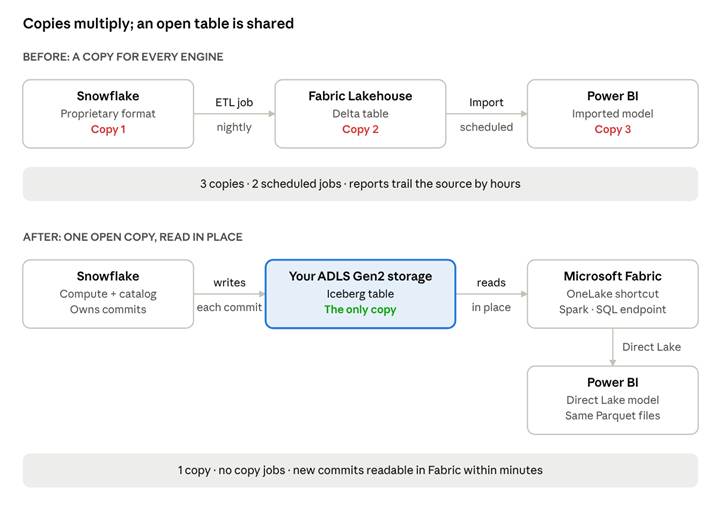
before and after · three copies vs. one shared open table
Before: three copies and two scheduled jobs. After: one copy, no copy jobs, and every engine reading the same files.
What Apache Iceberg Is
Apache Iceberg is an open-source table format: a specification for organizing data files so that they behave like a database table. It does not run queries itself. Any engine that supports the specification can read and write the same table.
The data itself is stored as Parquet, an open columnar file format. On top of it, Iceberg keeps a small metadata layer in JSON and Avro, an open binary format that carries its own schema. That metadata records the schema, the partitioning, and exactly which Parquet files make up each version, or snapshot, of the table.
Three properties follow from this design:
- Atomic commits. A write adds new files, then swaps one pointer to a new metadata file in a single step. Readers never see a half-written table.
- Snapshots and time travel. Every commit is a version that can be queried, audited or rolled back.
- Neutral by design. Any engine that implements the specification follows the same chain of pointers to the same files.
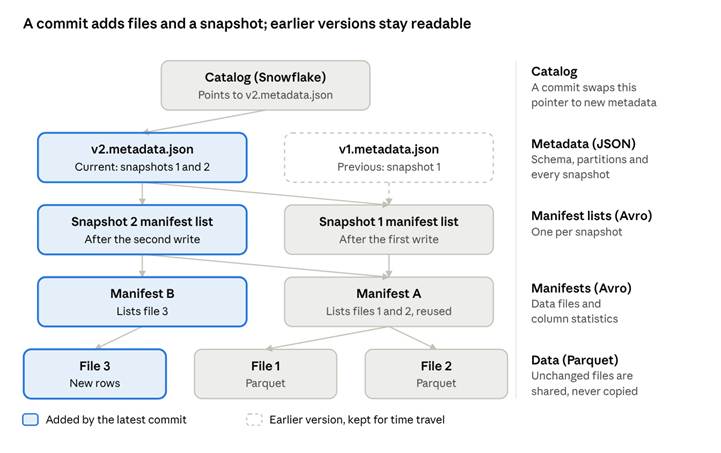
anatomy of an Iceberg table · catalog, metadata layer, data layer
The metadata layer is small and the data layer is large. Adding another engine therefore only requires reading the metadata. The data files stay where they are.
Reference Architecture
The architecture has three zones. Snowflake owns the compute and the commits. The organization's Azure tenant owns the data. Microsoft Fabric reads that data through a pointer.
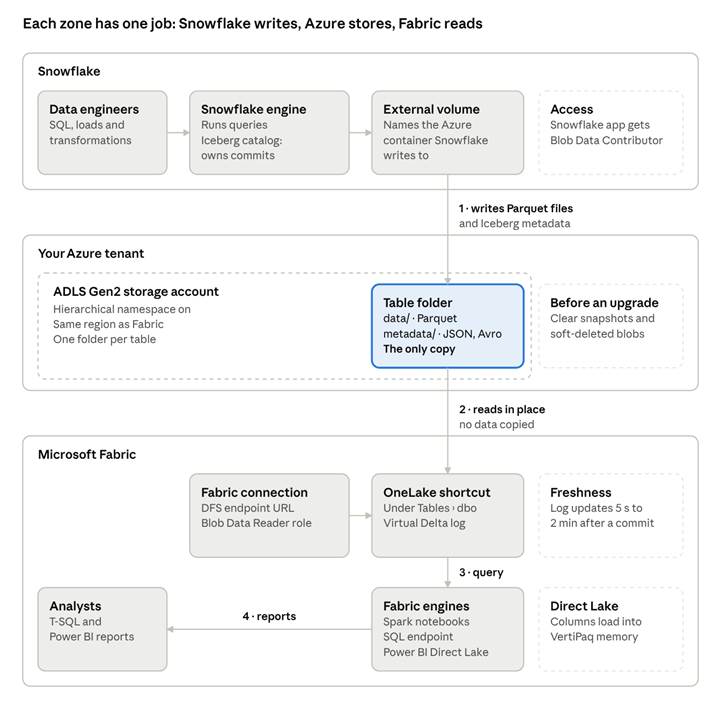
reference architecture · Snowflake, Azure storage, Microsoft Fabric
Data crosses the zone boundaries only as writes into the table folder and reads out of it. The table folder holds the only physical copy.
|
Component |
Role |
Lives in |
|
Snowflake engine |
Runs queries and transformations; acts as the Iceberg catalog |
Snowflake |
|
External volume |
Authorizes Snowflake to write to a named storage location |
Snowflake, pointing to Azure |
|
ADLS Gen2 storage account |
Holds the table's Parquet data and Iceberg metadata |
The organization's Azure tenant |
|
OneLake shortcut |
Presents the Iceberg table to Fabric as a Delta table, without copying |
Fabric Lakehouse |
|
Fabric engines |
Query the same files through Spark, T-SQL and Direct Lake |
Microsoft Fabric |
How It Works, Step by Step
The pattern has five parts, in this order.
1. Snowflake writes to storage the organization owns
An external volume is a Snowflake object that names a storage location in the organization's own cloud account and grants Snowflake permission to write there. An Iceberg table created on that volume stores its files in that location instead of in Snowflake-managed storage.
CREATE EXTERNAL VOLUME exvol_lakehouse
STORAGE_LOCATIONS = ((
NAME = 'adls_lakehouse'
STORAGE_PROVIDER = 'AZURE'
STORAGE_BASE_URL = 'azure://<account>.blob.core.windows.net/<container>/'
AZURE_TENANT_ID = '<tenant_id>' ));
CREATE ICEBERG TABLE customer_telemetry ( ... )
EXTERNAL_VOLUME = 'exvol_lakehouse'
CATALOG = 'SNOWFLAKE'
BASE_LOCATION = 'telemetry';
CATALOG = 'SNOWFLAKE' makes Snowflake the table's catalog: it manages commits, and other engines read. Snowflake users query it like any other table.
2. The storage account holds an open table
Each table gets its own folder with two subfolders: data/ for Parquet files and metadata/ for the JSON and Avro files that track every version. All of these formats are open.
For Fabric to reference it, the storage account must be Azure Data Lake Storage Gen2 with hierarchical namespace enabled.
3. A OneLake shortcut points Fabric at the table
A OneLake shortcut is a pointer inside a Fabric Lakehouse to data stored elsewhere. Created under Tables, and targeted at the Iceberg table's folder, it makes the table appear in the Lakehouse without moving a byte.
4. OneLake translates the metadata
Fabric's engines speak Delta Lake. When a shortcut points at an Iceberg table, OneLake generates a virtual Delta log from the Iceberg metadata, a process Microsoft calls metadata virtualization. Only metadata is created; the Parquet files are read where Snowflake wrote them.
Conversion runs after each commit and typically takes 5 seconds to 2 minutes. Its result is recorded in _delta_log/latest_conversion_log.txt, the first place to look when a table does not appear.
5. Every Fabric engine reads the same files
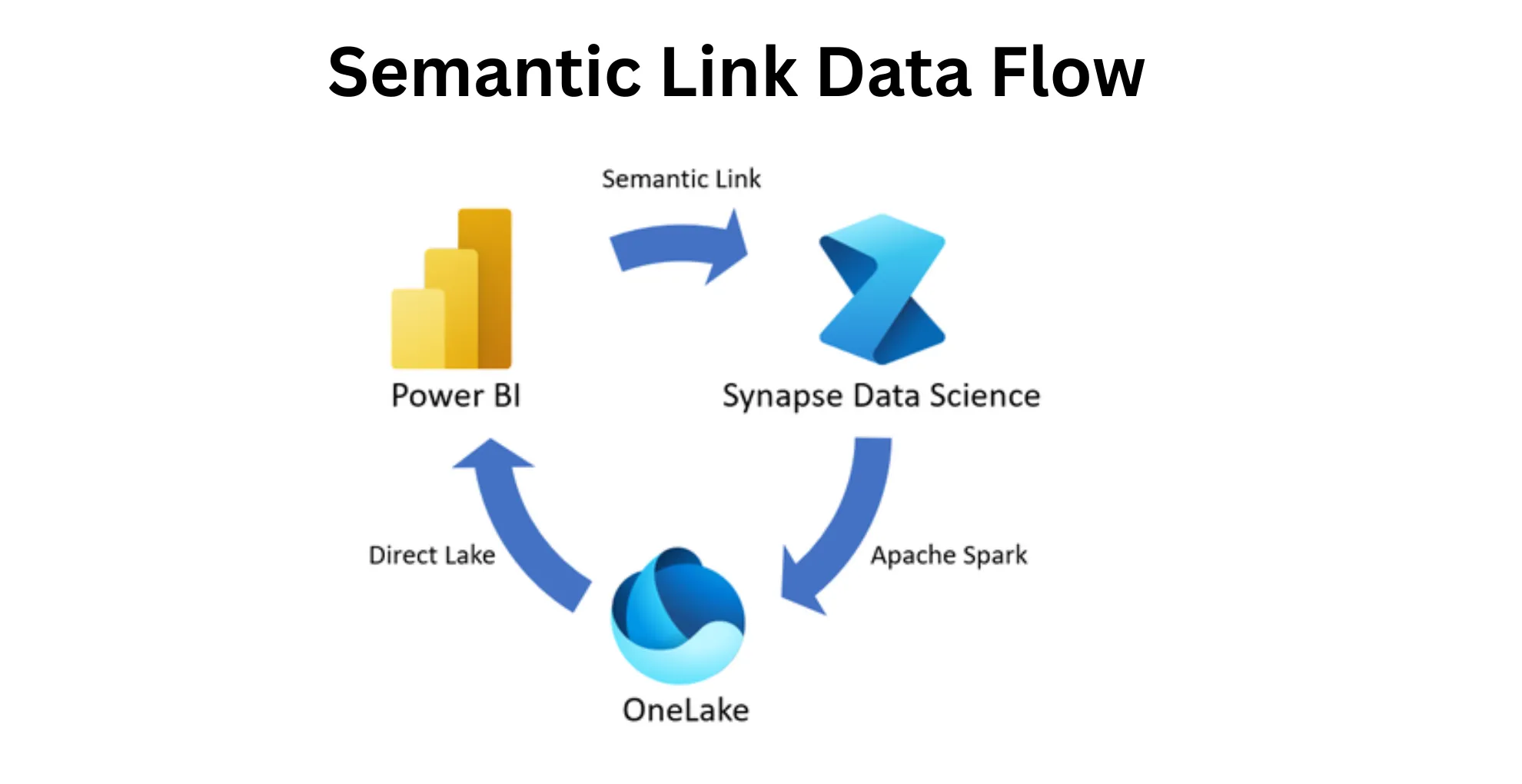
Spark notebooks, the SQL analytics endpoint and Power BI all read the shortcut as a normal Delta table. In Direct Lake mode, Power BI loads Parquet columns straight into its in-memory engine, VertiPaq, with no import refresh and no query translation. With the semantic model's automatic update setting on, new Snowflake commits reach reports without a scheduled refresh.
What the Business Gets
The technical change is a table format and a pointer. The business effects come from the work it removes.
Ownership and governance. The data sits in the organization's own Azure tenant, under its own security, retention and residency controls. Auditors and security teams can see exactly where it lives.
No pipeline to build or maintain. There is no copy job to schedule, monitor or repair overnight, and no second copy of storage to pay for.
One version of the truth. Snowflake and Fabric cannot drift apart, because there is only one copy of each table.
Fresher reporting. New commits are readable in Fabric within minutes. Direct Lake reports pick them up without waiting for an overnight import.
Right tool for each team. Data engineers keep working in Snowflake. Analysts keep working in T-SQL and Power BI. Neither group has to learn the other's platform to share data.
Lower reporting cost. Power BI reads the files from storage, so report traffic does not run on Snowflake compute.
A real exit strategy. Because the files follow a public specification, adding or replacing an engine later does not require a migration project.
Where Lock-In Still Applies
Iceberg removes storage and format lock-in. Some constraints remain.
The catalog is the new control point. With CATALOG = 'SNOWFLAKE', Snowflake owns commits and Fabric reads. Changing the engine that writes means migrating the catalog, though not the data. Choose the catalog as carefully as the warehouse.
Region and network rules apply. OneLake shortcuts must target storage in the same region, and the Iceberg virtualization feature does not support private links. Plan Snowflake, storage and Fabric capacity in one Azure region.
Conversion has limits. Iceberg-to-Delta virtualization fails on equality deletes, column renames and partition evolution across live files, and source tables need fewer than 5,000 commits. Types with no Delta equivalent are dropped, and Microsoft documents a known type-width issue with some Snowflake-written numeric columns.
Common Configuration Mistakes
Most failed first attempts trace back to setup details. These are the ones seen most often.
|
Symptom |
Likely cause |
Fix |
|
Shortcut creation fails with "Target path doesn't exist", though the folder is visible |
Storage account has hierarchical namespace disabled |
Upgrade the account to Data Lake Gen2, or use a new account with hierarchical namespace on |
|
Data Lake Gen2 upgrade validation fails |
Blob snapshots or soft-deleted blobs still exist, even if soft delete is now off |
Remove the snapshots and permanently delete the retained blobs, then validate again |
|
Shortcut is created but no table appears |
Shortcut was created under Files, which is never converted |
Recreate it under Tables and the schema, such as dbo |
|
Shortcut creation fails on the name |
Default name copies the folder, and Snowflake folder names can contain a dot |
Rename the shortcut before creating it |
|
Table appears under "Unidentified" |
Target is the container or a subfolder, not the table folder |
Point the shortcut at the folder that contains both data/ and metadata/ |
|
New rows never appear in Fabric |
A notebook copied the files into a separate Delta table instead of using a shortcut |
Replace the copy with a shortcut; the copy also ignores Iceberg snapshots |
|
Report needs credentials and a scheduled refresh |
Report was built on a SQL query, so the model is Import mode, not Direct Lake |
Create a semantic model from the Lakehouse table and build the report on it |
A storage account created with default settings may have hierarchical namespace off, and the upgrade is one-way and account-wide. Check this before Snowflake writes its first table.
Open Lakehouse Readiness Checklist
Storage
- ☐ Azure Data Lake Storage Gen2 account with hierarchical namespace enabled
- ☐ Account in the same Azure region as the Fabric capacity
- ☐ Network access allows Fabric, or trusted workspace access is configured
Snowflake
- ☐ External volume created and verified, with Snowflake's Azure application granted Storage Blob Data Contributor
- ☐ Iceberg tables created with a deliberate catalog choice
- ☐ Table designs avoid features that block conversion: equality deletes, column renames, partition evolution
Microsoft Fabric
- ☐ Connection uses the storage account's DFS endpoint (https://<account>.dfs.core.windows.net)
- ☐ Identity behind the connection has Storage Blob Data Reader or higher
- ☐ Shortcuts created under Tables and a schema, pointing at each table folder
- ☐ latest_conversion_log.txt reports success for every table
Reporting
- ☐ Semantic models created from the Lakehouse tables, in Direct Lake mode
- ☐ Automatic Direct Lake updates turned on
- ☐ Change process agreed: schema changes start in Snowflake and are validated in Fabric
Practical Recommendation
Prove the pattern on one table first.
- Pick one high-value table that more than one team needs, ideally one that is copied between Snowflake and Fabric today.
- Create a dedicated Data Lake Gen2 storage account for open tables, in the same region as the Fabric capacity.
- Recreate the table as a Snowflake-managed Iceberg table on an external volume.
- Shortcut it into a Fabric Lakehouse, build a Direct Lake report on it, and retire the old copy pipeline.
- Measure what changed: storage saved, pipeline hours removed, and how fresh the report is.
Once the first table works, the same steps apply to the next one.
Planning an open lakehouse across Snowflake and Microsoft Fabric? Armely is a strategic partner to both, and a certified Microsoft Solutions Partner for Data and AI. Learn more about Armely's data services or contact the team to start with a single table.
Sources
- Use Snowflake with Iceberg tables in OneLake, Microsoft Learn
- Use Iceberg tables with OneLake (table format virtualization), Microsoft Learn
- Create an Azure Data Lake Storage Gen2 shortcut, Microsoft Learn
- Upgrade Azure Blob Storage with Azure Data Lake Storage capabilities, Microsoft
- Store and use your Snowflake Iceberg data in OneLake, Microsoft Fabric Blog
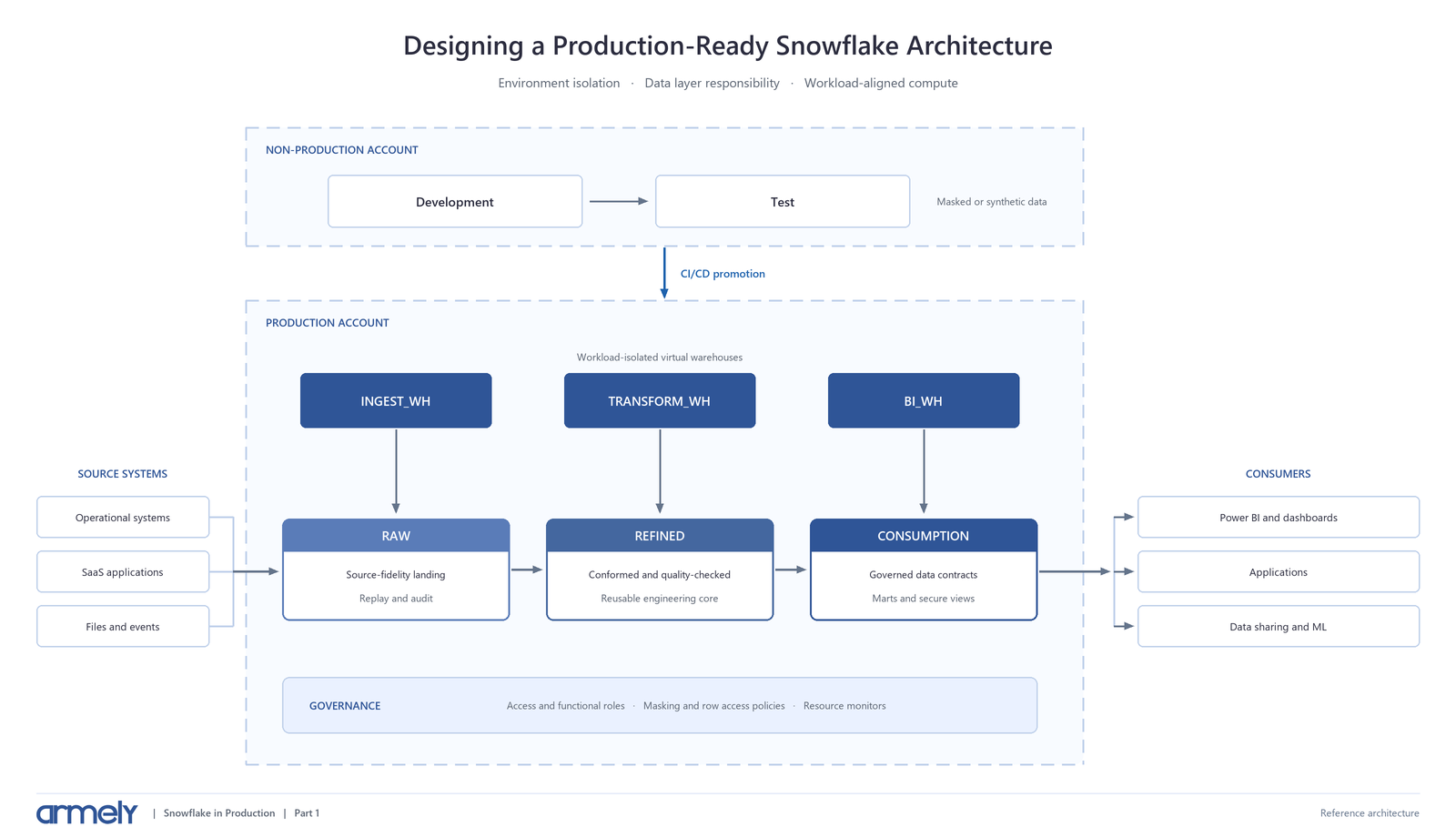
- Related on the Armely blog: Unlocking the Power of Direct Lake in Microsoft Fabric and Designing a Production Ready Snowflake Architecture