

Ingestion is where most Snowflake cost surprises and data quality incidents begin.
The decision usually gets framed as a latency question: how fresh does the data need to be? That question matters, but it is rarely the one that determines whether a pipeline survives contact with production. Pipelines fail because files were sized badly, because a retry loaded the same records twice, because a source added a column, or because nobody could tell which load failed and when.
Snowflake offers four practical ingestion approaches. Choosing between them well requires understanding what each one guarantees, what it costs, and how it behaves when something goes wrong.
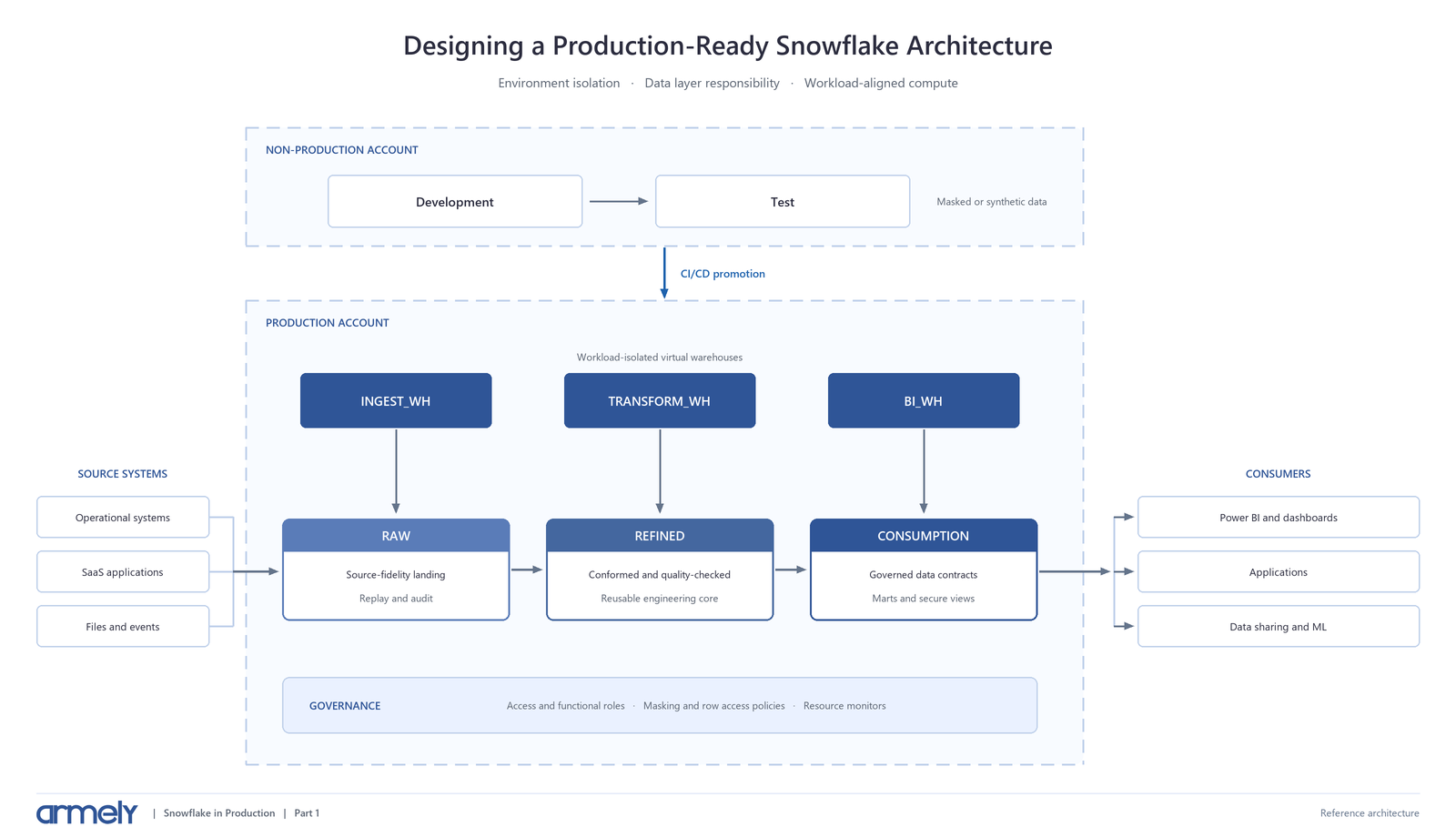
This article covers that decision. It builds on the layered architecture described in Part 1, where ingestion writes into a raw layer that preserves source fidelity.
The Four Patterns
Bulk Loading With COPY INTO
COPY INTO loads batches of staged files using a warehouse you provide and size.
It remains the right choice for scheduled batch work, historical backfills, and migrations. You control the compute, the transaction boundary, and the timing. Each COPY INTO runs as a single transaction, which makes reasoning about partial state straightforward.
Load history is stored in the target table's metadata for 64 days and returned directly as statement output, so failures are visible immediately.
|
COPY INTO raw.ingest.orders |
Bulk loading supports light transformation during load: column reordering, omission, casts, and text truncation. Your files do not need to match the target column order.
Snowpipe
Snowpipe loads files continuously as they arrive, using Snowflake-managed serverless compute billed per second. Cloud storage event notifications tell Snowpipe that new files are available.
Snowflake designs Snowpipe to load files typically within a minute of the notification, though this varies with file size, format, and transformation complexity. Snowflake explicitly declines to guarantee a latency figure and recommends measuring with representative loads.
Two behaviors matter operationally:
- Load order is not guaranteed. Snowpipe generally loads older files first, but multiple processes pull from the queue concurrently.
- Loads may span multiple transactions. Unlike COPY INTO, Snowpipe combines or splits loads into one or more transactions based on row count and size.
Snowpipe's load history lives in the pipe's metadata for 14 days and must be queried deliberately rather than read from statement output.
|
CREATE PIPE raw.ingest.orders_pipe |
Enable cloud event filtering on the notification source. Snowflake recommends it specifically to reduce cost, event noise, and latency, and it is frequently skipped.
Snowpipe Streaming
Snowpipe Streaming writes rows directly into tables with no staging files, removing object storage and connector hops that the workload does not otherwise need.
This service has been rebuilt on a high-performance architecture and now offers two ingestion modes. The distinction is the most important thing to understand before adopting it:
- Elastic Channels are the recommended starting point. Producers write directly without creating or coordinating channels, and Snowflake scales the ingest path. Delivery is at-least-once with no ordering guarantee, so consumers must tolerate duplicates and out-of-order rows.
- Named Channels use offset tokens to provide ordered, exactly-once ingestion within each channel. Use these when the source demands strict semantics, such as Kafka partitions or change data capture.
Snowflake publishes design targets of up to 20 GB/s per table and ingest-to-queryable latency as low as five seconds, with actual results depending on row size, table width, batching, and concurrency. Billing is throughput-based: credits per uncompressed GB ingested.
Access is available through Java, Python, and Node.js SDKs, a REST API for lightweight and edge workloads, and the Kafka connector. Prefer an SDK where possible, because the SDKs handle batching and compression automatically.
Note that an older "Snowpipe Streaming Classic" architecture still exists, most commonly via the Kafka connector. Teams running it should confirm which architecture they are on, because schema evolution tracking and capabilities differ.
Openflow and Managed Connectors
Snowflake Openflow is a managed integration service built on Apache NiFi, deployable in your own cloud or within Snowflake using Snowpark Container Services.
It targets the work that is tedious to hand-build: database CDC replication, SaaS platform extraction, Kafka topic ingestion, and unstructured content from sources like SharePoint or Google Drive for AI workloads.
Openflow is worth evaluating when connector maintenance is the real cost, not load performance. Building and maintaining a bespoke Salesforce or Postgres CDC pipeline is rarely a good use of engineering time.
Decision Matrix
|
Factor |
COPY INTO |
Snowpipe |
Snowpipe Streaming |
Openflow |
|
Typical latency |
Minutes to hours |
~1 minute after notification |
Seconds |
Source-dependent |
|
Compute model |
Your warehouse |
Serverless, per second |
Throughput, per GB |
Deployment and runtime |
|
Input shape |
Staged files |
Staged files |
Rows from applications |
Connector-driven |
|
Ordering |
Per statement |
Not guaranteed |
Guaranteed with Named Channels |
Connector-dependent |
|
Delivery semantics |
Transactional |
File-level dedup |
At-least-once or exactly-once |
Connector-dependent |
|
Load history retention |
64 days |
14 days |
Event table telemetry |
Runtime telemetry |
|
Best for |
Backfills, scheduled batch |
File-producing pipelines |
Applications, IoT, CDC |
SaaS, database CDC |
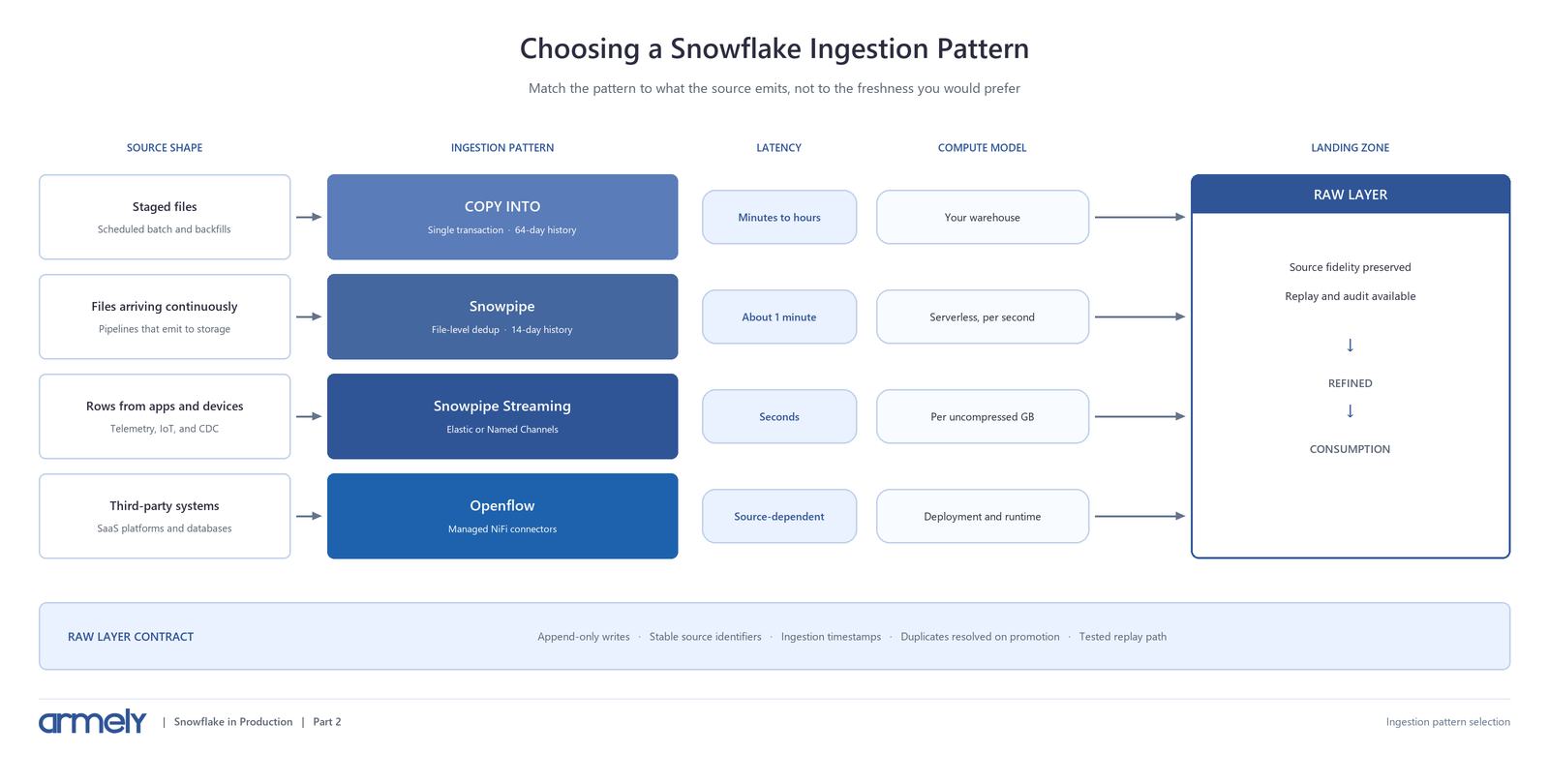
A useful rule: if your upstream already produces files, use Snowpipe. If it produces rows, use Snowpipe Streaming. If it is a system someone else already built a connector for, evaluate Openflow before writing code.
Choosing an ingestion pattern by source shape
|
What the source emits |
Deciding question |
Pattern |
|
Files in cloud storage |
Minutes to hours is acceptable |
COPY INTO on a schedule |
|
Files in cloud storage |
Near real time required |
Snowpipe with auto-ingest |
|
Rows from an application or device |
Duplicates acceptable |
Snowpipe Streaming — Elastic Channels |
|
Rows from an application or device |
Ordering and exactly-once required |
Snowpipe Streaming — Named Channels |
|
A third-party system or database |
Connector already exists |
Openflow or managed connector |
File Sizing Decides Your Cost
For both bulk loading and Snowpipe, Snowflake recommends producing files of roughly 100-250 MB compressed.
This single detail drives more ingestion cost variance than warehouse size.
Loading many tiny files is expensive because Snowpipe includes per-file queue management overhead in its charges, and that overhead grows with file count. A pipeline emitting thousands of 1 MB files pays a disproportionate management cost relative to the data loaded.
Very large files cause the opposite problem. Parallelism is bounded by the number of files, so a single enormous file cannot be spread across a warehouse's compute. Snowflake advises against loading files of 100 GB or more, and any load exceeding 24 hours can be aborted without committing.
If your source cannot accumulate 100 MB within a minute, produce one file per minute rather than many smaller ones. Staging files more frequently than once per minute does not reliably reduce latency and increases queue overhead.
Duplicates Are a Design Decision
Each pattern handles duplicate prevention differently, and the differences are easy to get wrong.
Snowpipe tracks loaded file paths and names in per-pipe metadata. It will not reload a file with the same name, even if the file contents were later modified. Teams that overwrite files in place discover that updates are silently ignored.
Bulk loading tracks load metadata on the table for 64 days.
Because these are separate metadata stores, Snowflake warns against loading the same set of files using both bulk loading and Snowpipe. Doing so duplicates data.
Snowpipe Streaming with Elastic Channels is at-least-once. Duplicates are expected, not exceptional. Deduplicate downstream using a business key and an ingestion timestamp, or use Named Channels where the source supports offset tracking.
The practical guidance: make raw-layer writes append-only and idempotent, carry a stable source identifier, and resolve duplicates when promoting to the refined layer rather than trying to prevent every duplicate at ingestion.
Handling Schema Drift
Sources add columns. Without a plan, this either breaks loads or silently discards data.
Snowflake supports automatic schema evolution when three conditions are met: the table has ENABLE_SCHEMA_EVOLUTION = TRUE, the load uses MATCH_BY_COLUMN_NAME, and the loading role holds EVOLVE SCHEMA or OWNERSHIP on the table.
|
ALTER TABLE raw.ingest.orders SET ENABLE_SCHEMA_EVOLUTION = TRUE; |
Snowflake can add new columns and drop NOT NULL constraints on columns missing from new files. By default it adds at most 100 columns and evolves one schema per COPY operation.
Schema evolution works with COPY INTO, Snowpipe, and Snowpipe Streaming on the high-performance architecture. It does not apply to INSERT operations or tasks. For CSV, pair it with PARSE_HEADER and set ERROR_ON_COLUMN_COUNT_MISMATCH = FALSE.
Changes are recorded in a SchemaEvolutionRecord field visible through DESCRIBE TABLE and the COLUMNS views, which gives you an audit trail. Review it. Automatic evolution is a convenience, not a substitute for knowing your sources changed.
Recovery and Monitoring
An ingestion pattern is only production-ready when someone can answer: did it load, and if not, why?
COPY_HISTORY covers both bulk and Snowpipe loads for the last 14 days. Use the Account Usage view for longer retention.
|
SELECT file_name, status, row_count, error_count, |
The STATUS column distinguishes Loaded, Load failed, Partially loaded, and Load skipped. Treat Partially loaded and Load skipped as alertable. A skipped load usually means Snowpipe already saw that filename.
To diagnose a failing file without loading it, validate first:
|
COPY INTO raw.ingest.orders |
Two details worth knowing. Snowflake's DML error logging feature does not apply to COPY INTO or Snowpipe; those paths report through COPY_HISTORY instead, while Snowpipe Streaming has its own error tables and event telemetry. And if you record load time with a CURRENT_TIMESTAMP default column, values will be earlier than actual insertion because the expression is evaluated at compile time. Use METADATA$START_SCAN_TIME instead.
Finally, a paused pipe retains event notifications for only 14 days before becoming stale. A pipe paused during an extended incident can silently miss files.
Common Ingestion Failures
Sizing the warehouse instead of the files. Increasing warehouse size does not improve load performance when file count is the constraint. Fix file sizing first.
Overwriting files in place. Snowpipe deduplicates on filename. Modified files with unchanged names are not reloaded.
Mixing bulk and Snowpipe on the same files. Separate metadata stores means duplicated data.
Assuming Elastic Channels are exactly-once. They are at-least-once with no ordering guarantee. Design downstream logic accordingly or use Named Channels.
No alerting on skipped loads. A silent Load skipped is indistinguishable from success on a dashboard that only counts rows.
Choosing streaming for batch-shaped data. Streaming adds operational surface area. If the business consumes data hourly, minute-level Snowpipe is simpler and cheaper.
Ingestion Readiness Checklist
Before an ingestion pipeline carries production data:
- Latency requirement is stated in business terms and measured, not assumed.
- Files are sized in the 100-250 MB compressed range where the pattern uses files.
- Sources emit new filenames rather than overwriting existing ones.
- Bulk loading and Snowpipe are not both pointed at the same files.
- Cloud event filtering is enabled on notification sources.
- Duplicate resolution is defined and implemented at a known layer.
- Schema evolution is either enabled deliberately or drift fails loudly.
- COPY_HISTORY or streaming telemetry is monitored, with alerts on failed, partial, and skipped loads.
- Replay procedure is documented and has been tested at least once.
- Ingestion runs under a dedicated role and warehouse, separate from transformation and BI.
Practical Recommendation
Start by identifying what the source actually emits, not how fresh you would like the data to be.
For file-producing pipelines with minute-level freshness needs, use Snowpipe with auto-ingest, correct file sizing, and event filtering. For scheduled batch and backfills, use COPY INTO with a dedicated ingestion warehouse. For applications, devices, and CDC, use Snowpipe Streaming, choosing Named Channels when ordering or exactly-once delivery is required. For third-party systems, evaluate Openflow or an existing connector before building anything.
Then make the raw layer forgiving. Append-only writes, stable source identifiers, ingestion timestamps, and a tested replay path will recover you from most ingestion incidents regardless of which pattern you chose.
The pattern determines your latency and cost. The raw layer design determines whether a bad day becomes a bad quarter.
Building or repairing Snowflake ingestion pipelines? Armely designs ingestion architectures that are cost-predictable, recoverable, and honest about their delivery guarantees. Explore Armely's data services or contact our team.
Continue the Series
Previous: Designing a Production-Ready Snowflake Architecture
Next: Building Reliable Incremental Pipelines in Snowflake
Technical review sources:
- Snowflake: Overview of data loading
- Snowflake: Snowpipe
- Snowflake: Snowpipe Streaming
- Snowflake: Preparing your data files
- Snowflake: Enable automatic table schema evolution
- Snowflake: COPY_HISTORY
- Snowflake: About Openflow