
OneLake catalog in Microsoft Fabric
Most data governance programmes fail in the same place. Not at the policy. Not at the tooling. They fail at the moment someone types a table name into a search box and gets back four results that look identical.
That person has ten minutes. They pick one. They build a report on it. Six months later, a number in a board pack traces back to a copy of a table that nobody has owned since the person who made it changed teams.
The OneLake catalog exists for that moment. It puts the governance signal where the decision happens, at the point of choosing, rather than in a document nobody opens.
Here is what it does and how to get value out of it.
What the catalog actually is
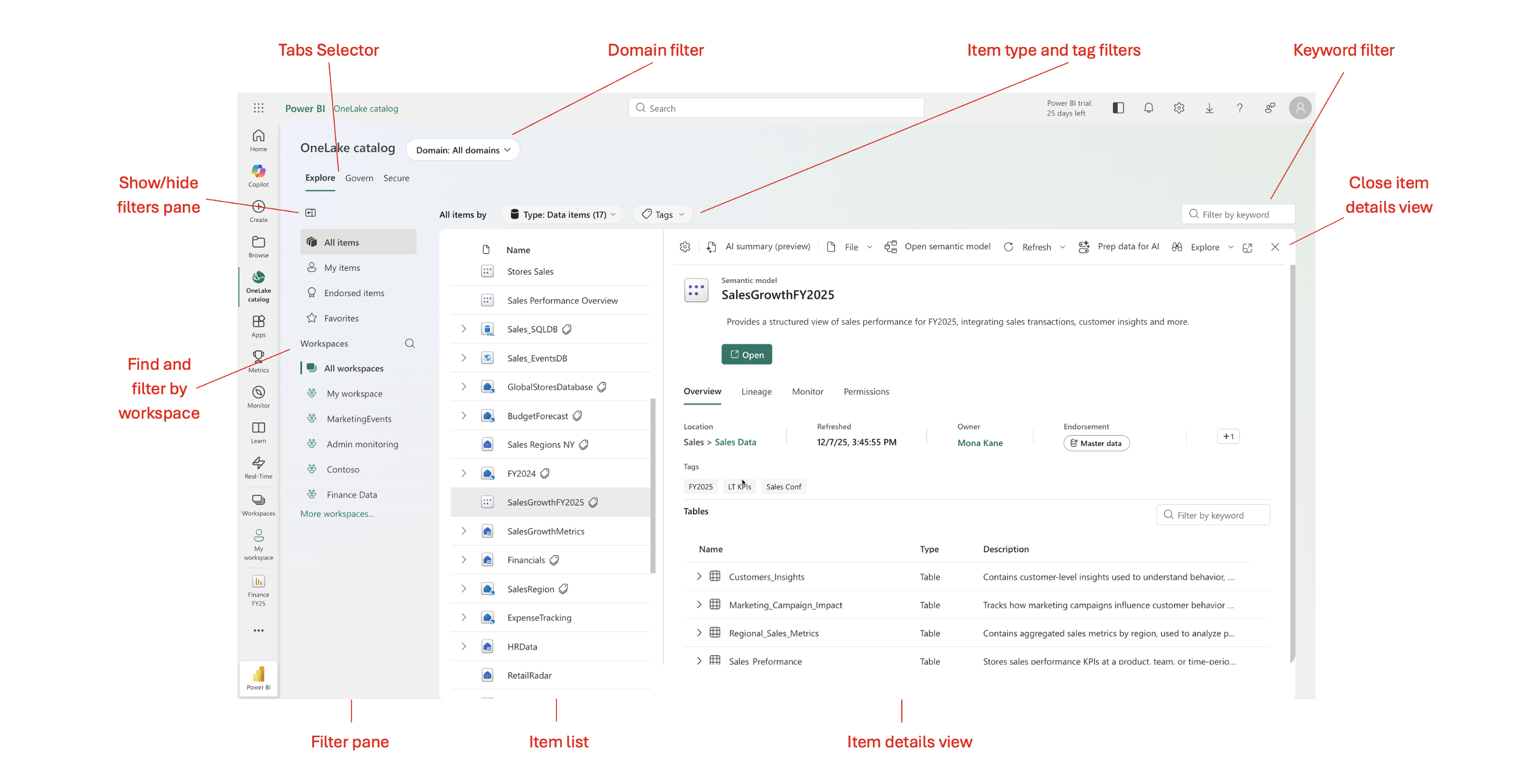
The OneLake catalog is the central place in Microsoft Fabric to find, explore, and govern your data. You reach it from the Fabric navigation pane, and it is also embedded in Microsoft Teams, Microsoft Excel, and Microsoft Copilot Studio, so people can discover and act on items without leaving the app they already work in.
That last point matters more than it sounds. Governance that lives in a separate portal gets used by the governance team. Governance that appears inside Microsoft Excel gets used by everyone else.
The catalog has three tabs: Explore, Govern, and Secure. Each one answers a different question.
Explore: what people see before they choose
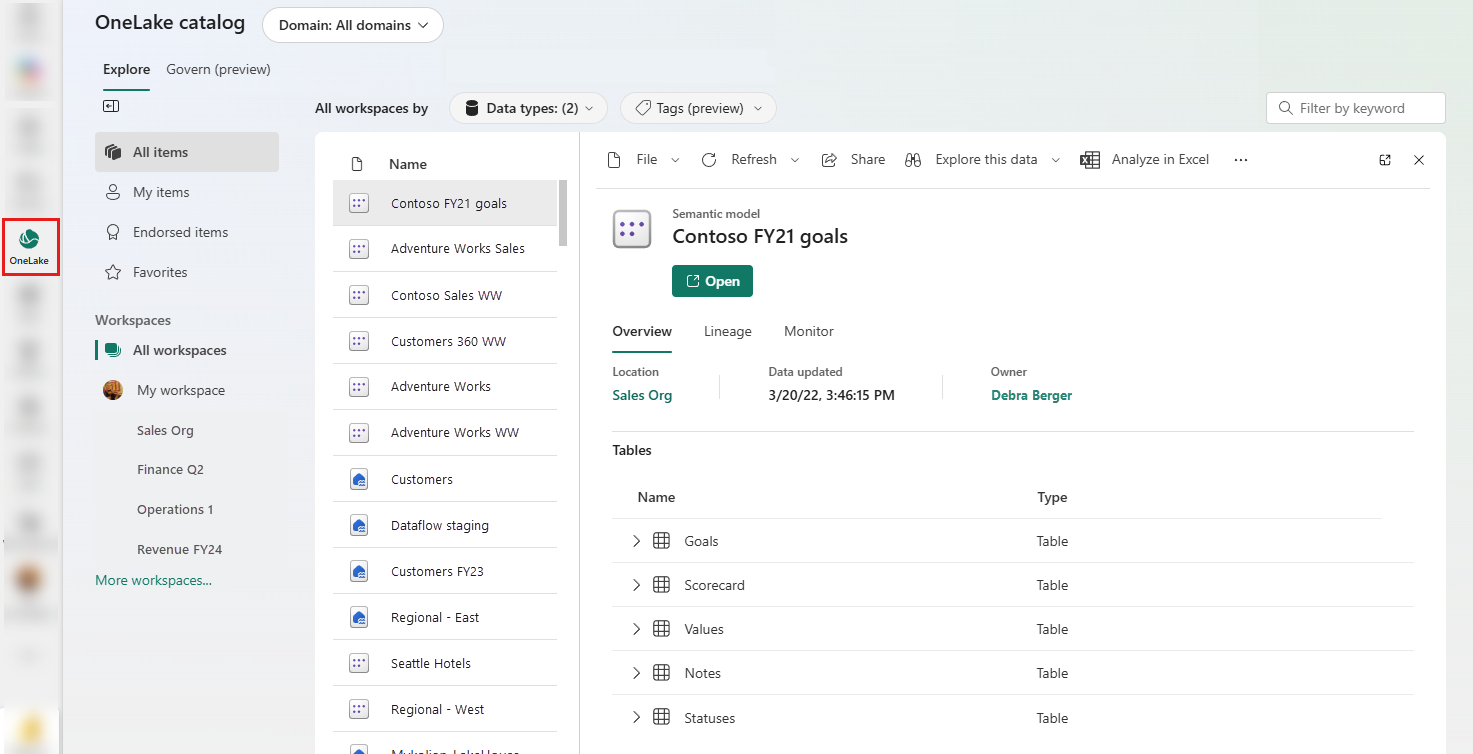
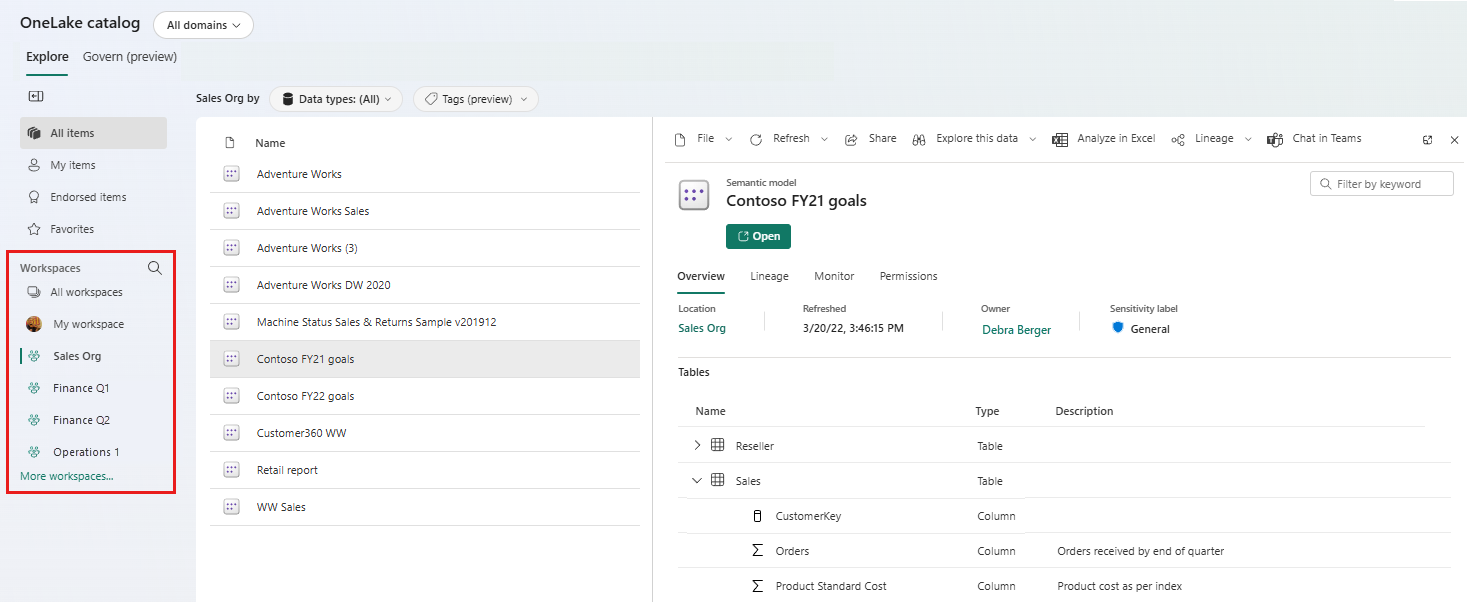
The Explore tab gives you an item list with an in-context details view, so you can browse and inspect items without losing your place in the list. It opens here by default.
Three things travel with each item in that list, and they do the real work.
Endorsement
Fabric gives you three badges. Promoted means the creators think the item is ready to share. Certified means an organization-authorized reviewer has confirmed it meets your quality standards and can be treated as reliable and authoritative. Master data marks the core, single-source-of-truth items, such as customer lists or product codes.
The control that makes certification meaningful is who can apply it. Any user can request certification, but only users a Fabric administrator specifies can actually certify. Certification enablement can be delegated to domain administrators, so each domain can have its own set of reviewers.
Read that twice if you own a domain. It means the clinical stewards decide what counts as certified clinical data, not a central team three floors away who have never seen an encounter record.
Domains
A domain is not a folder. It is a statement about who is accountable for a set of data. Once you define them, they become a key scope for discovery and governance throughout Explore and Govern.

Ownership and description
A named human, and a sentence explaining what the thing is for. Unglamorous. It resolves more disputes than any other field in the product.
AI Auto-Summary
For semantic models, Explore can also generate an AI Auto-Summary in preview, using the model's metadata and structure to help people understand what an item contains before they open or reuse it. It does not replace ownership, endorsement, or a human-written description, but it lowers the cost of getting useful context in front of the person making the choice.
Search your busiest table name. Count how many results come back, and how many carry a badge, an owner and a description. That number is your governance posture, more honestly than any maturity assessment.
Govern: turning governance into a backlog
The Govern tab is the part most teams underuse.
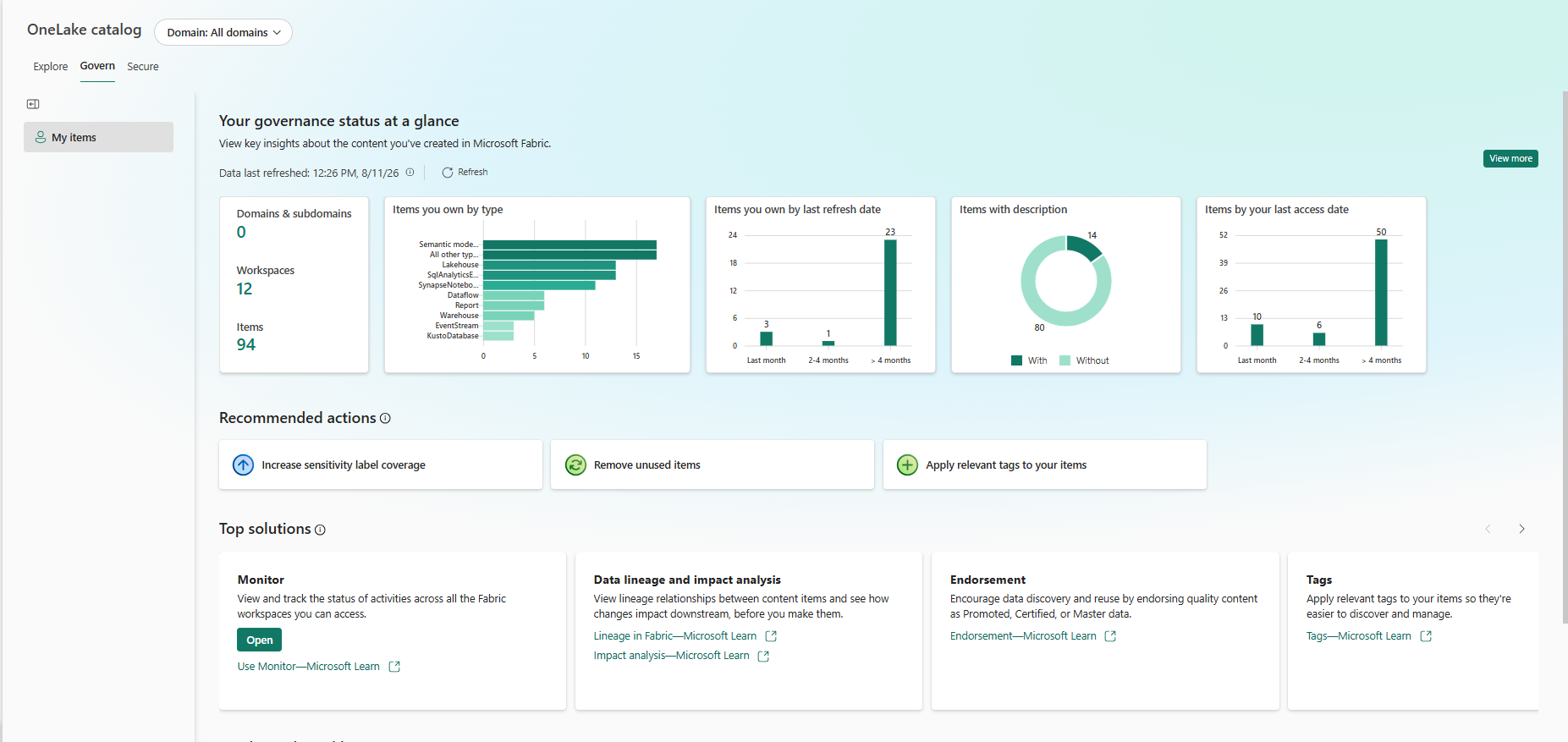
It brings together insights that show the governance status of your data, recommended actions to improve it with guidance on how to carry them out, and links to the tools and learning resources you need.
What you see depends on who you are. Fabric admins see insights based on the entire tenant metadata, covering items, workspaces, capacities, and domains. Data owners see insights based on the items they own. Admins land on All Data in Fabric by default and can switch to My items; data owners see their own items first.
If you have defined domains, the domain selector scopes both the insights and the recommended actions to that domain or subdomain. This is how you give a steward a view they can act on instead of a tenant-wide number they can only feel bad about.
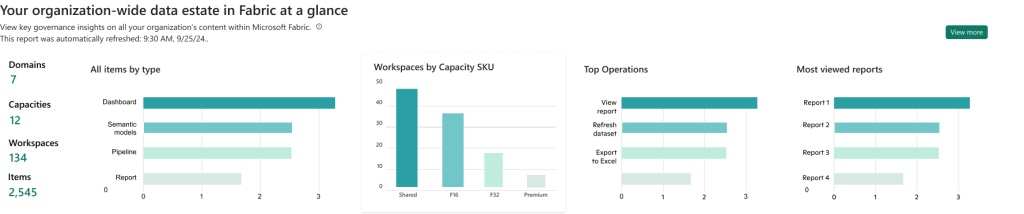
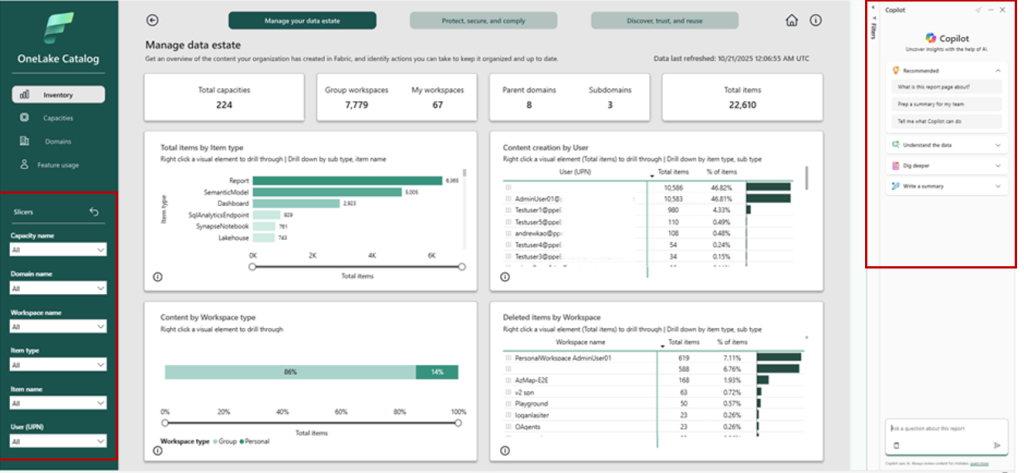
Select View more and the detail opens up. Admins get expanded insights across three areas: Manage your data estate, covering inventory, capacities, domains and feature usage; Protect, secure and comply, covering sensitivity label coverage and DLP policies; and Discover, trust, and reuse, covering data freshness, curation state, description and endorsement coverage, and content sharing.
Two of those views repay attention immediately.
The sensitivity labels selector shows your most frequently used labels and the percentage of unlabelled items, and lets you drill down by item type and user to find labelling gaps. The percentage of unlabelled items is one of the most useful governance numbers you can put in front of a board. It is specific, it moves, and it maps directly to risk.
The DLP selector shows which workspaces and items your DLP policies evaluated, along with the last evaluation time, so you can judge whether the data is fresh and trigger a new scan if it is not.
Then there are the recommended actions. Each card explains the issue, why it matters, and the steps to fix it. In the My items view, data owners can also see every entity behind a recommendation and open any of them in one click.
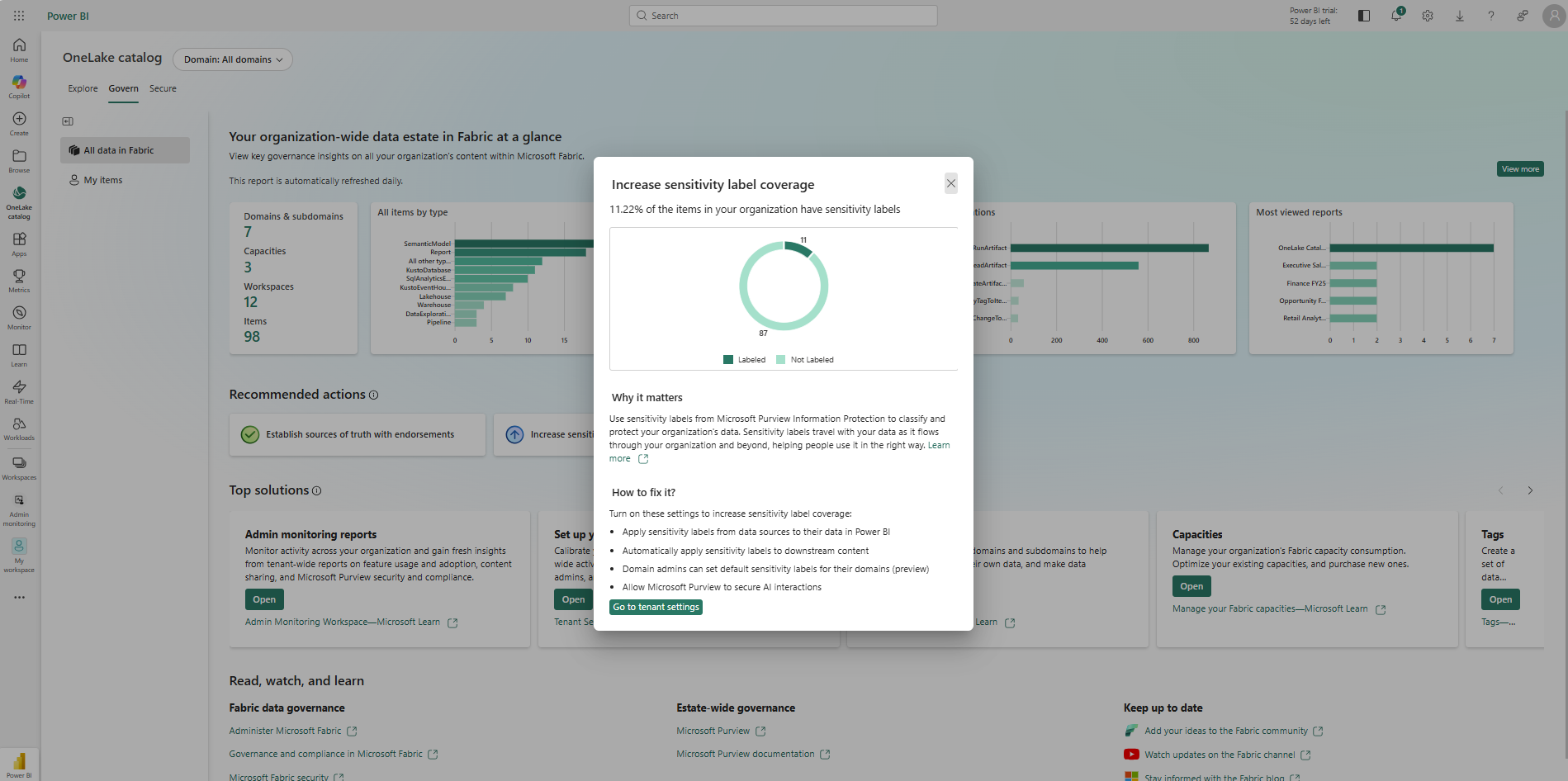
That is the design idea worth stealing even if you never use the product. Governance stops being a quarterly initiative and becomes a queue of small fixes with a named owner and a link straight to the thing that needs fixing.
Secure: permissions you can audit in one place
The Secure tab centralizes security management by giving you a unified view of workspace roles and OneLake security roles across items, so admins can audit permissions, view user access, and create, edit, or delete security roles from one location.
Two pages do the work.
View users shows everyone with access to the workspaces you select, with a count of the roles they hold. You can filter by user type, workspace role, or workspace, and search for a specific person or group to verify their permissions. From the ribbon you can add users to a role across several workspaces at once, or edit and remove roles in bulk. Onboarding new starters to a Viewer role across every relevant workspace is one action, and so is removing a group of interns when they leave.
View security roles lists every OneLake security role across the selected workspaces, showing the item, role name, permission granted, the workspace it lives in, and the data owner. You can open a role to edit the data and members inside it, duplicate it, create a new one, or delete it.
What you can see depends on your own access. Admin or Member on a workspace is required to see that workspace's data; Contributors and Viewers only see information about their own access.
Bulk role removal is the underrated feature here. Most access-creep problems are not caused by bad grants. They are caused by grants that nobody ever got round to reversing because reversing them was tedious.
You do not need Purview Unified Catalog to start
This is the point that surprises people most.
The core catalog and governance capabilities run natively inside Microsoft Fabric. You can start with domains, endorsement, ownership metadata, Govern insights, and access management without deploying Microsoft Purview Unified Catalog.
Purview becomes relevant when governance needs to extend across platforms, or when you need Fabric-specific security and compliance capabilities such as sensitivity labels, data loss prevention, audit, and protection policies. If your immediate problem is making Fabric data easier to find, trust, govern, and secure, the OneLake catalog gives you a useful place to begin.
Starting with the catalog also means you can begin improving governance without waiting for a broader enterprise catalog programme to finish.
A few limitations worth knowing
- Subitems such as tables do not appear in the insights. Your reporting operates at item level.
- The Govern tab does not support cross-tenant scenarios or guest users, and it is not available when Private Link is turned on.
- Admin insights and the View more reports run on admin monitoring storage, which refreshes once a day, so there can be a gap of up to a day between what you see and the actual state.
- Data owner insights are fresher. They refresh each time you open the Govern tab, and there is a refresh button.
- Do not modify the autogenerated report or semantic model behind the Govern tab. They are required for the insights to work. If you want a custom report, copy it first or build a new one on the autogenerated semantic model.
- Third-party workload items are not included in the View more charts.
- Some Govern experiences depend on the right Fabric capacity and tenant configuration, and users opening the admin-monitoring content may need Power BI Pro unless the workspace is assigned to capacity.
Where to start
- Define your domainsNot by system, by accountability. If you cannot name the person who owns a domain, you have found your first real problem.
- Open the Govern tab and write down two numbersYour percentage of unlabelled items, and your endorsement coverage. These become your baseline.
- Certify one thing and deprecate its duplicateOne certified table with a named owner does more for trust than a policy document, because people see it at the moment they choose.
- Work the recommended actions as a queueAssign them. Review them monthly. Governance that arrives as a list of small fixes gets done. Governance that arrives as a programme gets scheduled and then rescheduled.
The pattern underneath all four is the same. Governance works when the signal reaches the person at the moment they decide, and when the fix is a click away from the finding.
Further reading
For current product behaviour and limitations, see Microsoft Learn: OneLake catalog overview, Explore in the OneLake catalog, Govern in the OneLake catalog, and Microsoft Purview and Fabric.
Watch the session
We ran a LinkedIn Live session, Data Governance in the Age of AI: From Governed Data to Governed AI, where we demonstrate all of this on a live Fabric lakehouse, then show what happens when an AI assistant sits on top of it and is asked a question that spans two governed systems.
Work with Armely
We design and implement data and AI governance in the Microsoft ecosystem. Domain models, catalog rollouts, sensitivity labelling, and the approved data products that let an AI assistant answer a question safely. If you want the reference architecture from the session, or a look at where your own estate sits, get in touch.
Talk to us