
FabCon in Barcelona, Part 3: Pay for What You Use, Manage Every Database
Part 3 of 3 in our series "What FabCon in Barcelona means for your data platform.
Starting with Fabric has always meant one awkward step. You picked a capacity size before you knew how much you would use, then paid for it every month.
In Barcelona, Microsoft announced a way out. A new F0 SKU needs no upfront capacity, and on-demand billing charges you only for the compute you consume.
On the SQLCon side, your databases got one control plane. SQL Server, Azure SQL, PostgreSQL, and Cosmos DB now show up in one place inside Fabric.
This part covers what changes for the people who pay the bill and the people who keep the databases running.
Billing and capacity
You will soon start on Fabric with no upfront capacity and pay only for compute you use. Pricing is not published yet, so hold off on capacity decisions.
On-demand billing and F0 (coming in weeks)
- On-demand billing extends consumption pricing across Fabric workloads. Compute scales up and down with demand.
- F0 is a zero-provisioned SKU. It has no upfront compute charge and turns on-demand billing on by default.
- On F2 and up, you move individual billing categories onto on-demand and keep the rest on your reserved capacity.
- Usage is measured in CU-hours with no smoothing. Spend limits run over a rolling 24-hour window.
- Autoscale Billing for Spark is renamed On-demand billing for Apache Spark. It stays GA and unchanged.
Microsoft has not published the on-demand multiplier or F0 pricing. Nobody can model the cost yet.
Capacity overage (GA)
Overage keeps a capacity out of throttling by adding paid compute. It bills at three times the pay-as-you-go rate on a separate meter, with no reservation discount.
Watch the default. Microsoft Learn describes overage as opt-in but also says it is on by default for new capacities. Check the setting on every capacity you manage.
Other capacity updates
- Workspace-level surge protection (GA soon). You cap a workspace's consumption so a runaway job cannot throttle everyone else. Mission-critical workspaces can be exempt.
- F4096 and F8192 SKUs (GA) for the largest workloads.
- Capacity metrics app (GA). New heatmaps, health-state history, top item contributors, and chargeback integration.
- Capacity Insights and Actions (preview). You resize capacity, move workspaces, or change surge and overage settings straight from Monitor Hub.
Warehouse compute
- GPU-accelerated query execution: public preview in Fabric Data Warehouse
- Custom SQL pools: GA
- Teradata in Migration Assistant: preview
- Node-based billing for Warehouse: announced, pricing not published
What this means for you
F0 fits proofs of concept, spiky workloads, and small clients who balk at an F2 commitment. Pull your capacity metrics now so you compare costs the day pricing lands. Keep your reservations until then.
SQLCon: one place for every database
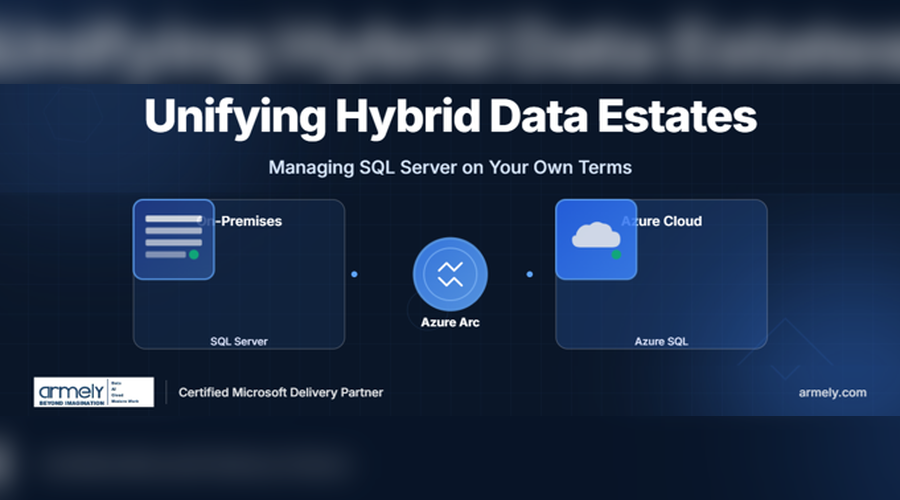
You now manage SQL Server, Azure SQL, PostgreSQL, and Cosmos DB from one place, and you run SQL Server on your own hardware with Azure tooling. This was SQLCon's first European edition, six months after its Atlanta debut.
Database Hub in Fabric (preview)
Database Hub is a single control plane for:
- SQL Server enabled by Azure Arc
- Azure SQL Database
- Azure Database for PostgreSQL
- Azure Cosmos DB
- SQL database in Fabric
From one screen, your admins check health, assess risk, enforce governance, and review performance. The databases stay where they are. Signals vary by service.
Database agents
These agents watch database signals for SQL and PostgreSQL on Azure. They find bottlenecks, rank recommendations, and help you troubleshoot. They work inside role-based access, approvals, and auditing.
The SQL agent starts in Database Hub. The PostgreSQL agent starts in VS Code. Microsoft's posts disagree on timing, from "soon" to "rolling out now," so confirm before you promise it to anyone.
SQL Server on Azure Local (GA)
SQL Server on Azure Local is generally available for both connected and disconnected operations. It targets:
- Regulated industries such as US healthcare and defense
- Edge sites such as factories and retail stores
- Air-gapped or intermittently connected environments
You keep the data where you need it and still get the Azure experience.
Azure SQL Database Hyperscale
- 192 vCore compute: GA, with 160 vCore Premium-series also GA
- Serverless auto-pause: preview. Compute pauses when idle, which cuts dev and test costs.
- Elastic pools: up to 50 databases per pool, in preview
DiskANN vector indexes (GA)
DiskANN vector indexes are GA for Hyperscale, Azure SQL Managed Instance, and SQL database in Fabric. You run vector search inside the database engine, and the index stays current as data changes.
That means you build RAG apps, semantic search, and recommendation engines without a separate vector store.
What this means for you
If you run a mixed database estate, Database Hub gives you one place to see its health. DiskANN GA removes the main reason to add a vector database to a SQL-based RAG design.
What to do next
- Collect capacity metrics now. When F0 and on-demand pricing lands, you compare costs the same day.
- Check overage on every capacity. Confirm it is set the way you want before a spike bills at three times the rate.
- Keep your reservations. Wait for published pricing before you change anything.
- Connect your databases to Database Hub. Start with the ones you worry about most.
- Revisit your RAG design. If you planned a separate vector store next to Azure SQL, test DiskANN first.
That's the series
Across three parts, one idea held: your data foundation is now your AI foundation. Clean models feed Copilot, agents build and run the pipelines, and the bill finally follows what you use.
If you missed the start, read Part 1: FabCon in Barcelona, Part 2: Agents Join Your Data Team | Armely Blog and Part 2: FabCon in Barcelona, Part 2: Agents Join Your Data Team | Armely Blog
Book a free Fabric capacity and cost review at armely.com, by emailing info@armely.com, or by calling 972-460-0643.
Read More
- FabCon and SQLCon 2026 in Barcelona: Building the data foundation for Microsoft Copilot and agents (Arun Ulag, Microsoft Azure Blog)
- Build, deploy, and govern Microsoft Fabric at scale (Kim Manis, Fabric Updates Blog)
- SQLCon Barcelona 2026: Advancing SQL with greater control, scale, and intelligence (Shireesh Thota, Microsoft SQL Server Blog)
- FabCon Europe 2026: The Announcements That Matter (Solv Systems)