
Deployment Pipeline in Microsoft Fabric
For many years, data and analytics teams operated without the structured development lifecycle that traditional software engineering has long relied on. Reports, dashboards, data models, and transformation pipelines were often built directly in production or managed through fragmented manual processes, with limited version control, inconsistent testing practices, and little governance over how changes were introduced. While software developers benefited from mature DevOps frameworks, branching strategies, testing environments, and controlled release pipelines, data teams were frequently left managing business-critical solutions without the same level of deployment discipline.
Microsoft Fabric addresses this long-standing challenge through Deployment Pipelines, a powerful lifecycle management capability that introduces structured Application Lifecycle Management (ALM) to the world of data engineering and business intelligence.
Deployment pipelines in Fabric create a structured path for promoting content across environments while reducing risk, improving collaboration, and ensuring consistency.

What Are Deployment Pipelines in Microsoft Fabric?
Deployment pipelines are Fabric’s built-in Application Lifecycle Management (ALM) framework that enables organizations to:
- Move content from development to testing to production
- Compare environments before deployment
- Track changes across workspaces
- Reduce manual deployment errors
- Standardize release management
- Support CI/CD strategies
- Enable safer enterprise governance
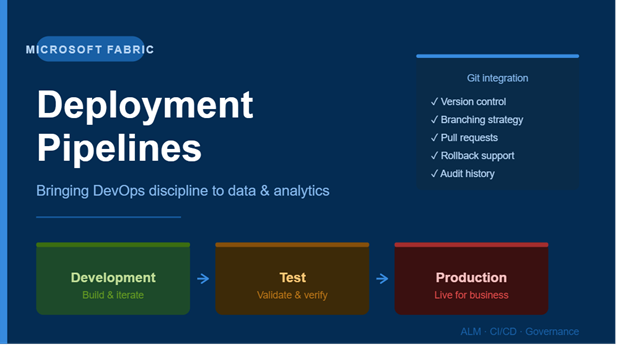
Each pipeline typically by default contains 3 stages , development , test and production but you can add as many as possible.
Understanding Pipeline Comparison Statuses
One of Fabric’s most valuable deployment features is environment comparison.

Same as Source
This indicates:
- No deployment needed
- Target stage matches source exactly
- Content is synchronized
Different from Source
This means:
- Changes exist in source workspace
- Target stage is outdated
- Deployment review is required
Only in Source
This status means:
- Item exists in source but not target
- New assets are ready for deployment
Key Components Supported in Deployment Pipelines
Fabric deployment pipelines can manage:
- Lakehouses
- Dataflows Gen2
- Semantic Models
- Reports
- Dashboards
- Notebooks
- Warehouses
- Data agents (preview)
- Copy jobs
This broad support makes deployment pipelines central to enterprise Fabric governance.
Git Integration + Deployment Pipelines: Complete CI/CD
Fabric becomes significantly more powerful when deployment pipelines are combined with Git integration.
Git Integration Enables:
- Version control
- Branching strategies
- Pull requests
- Team collaboration
- Rollbacks
- Code history

Recommended Enterprise Workflow:
- Developer creates isolated branch
- Changes committed to Git
- Pull request reviewed
- Changes merged into shared development branch
- Development workspace updated
- Deployment pipeline promotes to Test
- Testing completed
- Production deployment approved
This process mirrors mature DevOps practices used in software engineering.
Real Business Benefits of Deployment Pipelines
1. Reduced Deployment Risk
Organizations avoid accidental production outages by validating changes first.
2. Faster Release Cycles
Teams can ship improvements rapidly without sacrificing governance.
3. Improved Collaboration
Multiple developers can safely contribute simultaneously.
4. Enterprise Governance
Approval layers, testing checkpoints, and deployment history improve compliance.
5. Scalability
Supports growth from small BI teams to global enterprise data platforms.
Common Mistakes Organizations Make
Skipping Test Environments
Deploying directly to production increases business risk.
No Git Integration
Without source control, rollback and collaboration become difficult.
Hardcoded Environment Variables
This creates deployment failures across environments.
Poor Workspace Governance
Unclear ownership leads to deployment confusion.
Ignoring Change Reviews
Unreviewed deployments may introduce broken logic or security issues.
Best Practices for Fabric Deployment Success
Recommended Standards:
- Always separate Dev, Test, and Prod
- Integrate with Git from day one
- Use naming conventions consistently
- Apply Variable Libraries
- Conduct deployment reviews
- Document release processes
- Assign clear workspace ownership
- Audit deployments regularly
- Use staged approvals for production
Microsoft Fabric deployment pipelines represent more than just a release tool.
They are a foundational governance system that enables organizations to:
- Build faster
- Deploy safer
- Scale smarter
- Govern better
As Fabric adoption grows, mastering deployment pipelines will separate basic implementations from true enterprise-grade solutions.
For move info visit Get started using deployment pipelines, the Fabric Application lifecycle management (ALM) tool - Microsoft Fabric | Microsoft Learn